


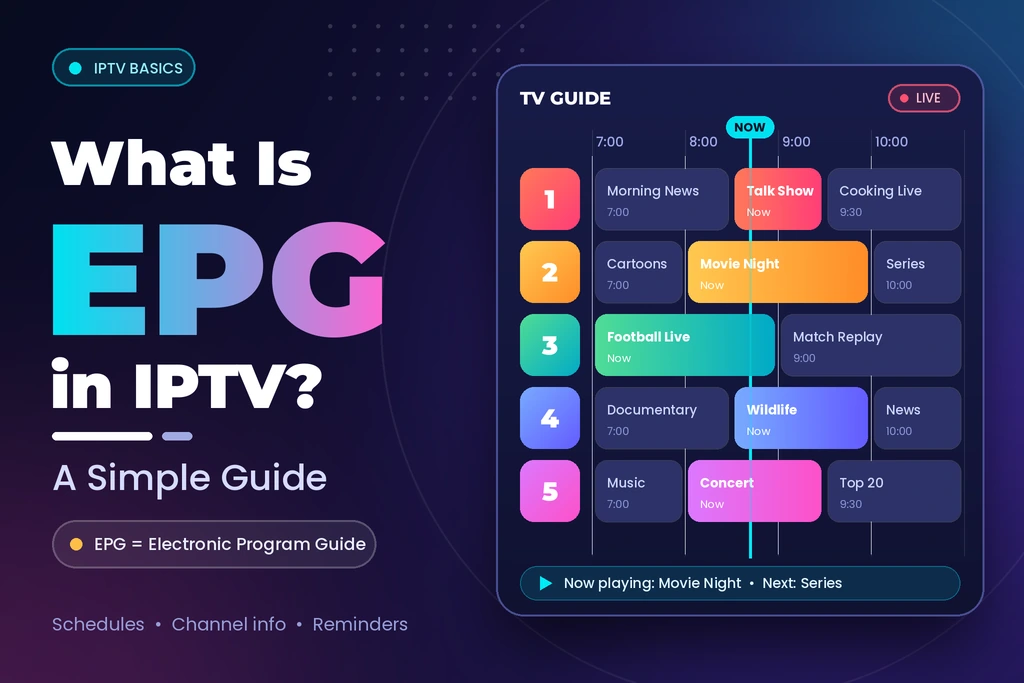
What Is EPG in IPTV? A Simple Guide
Ever sat down to watch TV and no one knew what was on? It happens a lot. Channels are flipped again and again, and time is wasted. EPG in IPTV was made to fix this. A list of shows is shown on the screen, so what is on now and later can be seen fast.
What Is EPG in IPTV?
EPG means Electronic Program Guide. It is a list of shows that is put on your TV screen. Channels are shown on one side and times are shown on top. Shows, movies, and games are all listed there. It is like a TV paper, but it is made on the screen. No paper is needed at all.
IPTV means TV that is sent through the internet. So the guide is also sent through the internet. The show names and times are filled in by the provider. When something changes, the list is changed too. Because of this, the guide is almost always up to date and no one has to check anywhere else.
Why Is EPG Needed?
Without a guide, live TV is a guess. A channel is opened, and the show is already half done. That is not nice. With EPG, the start time can be seen before anything is opened. Less time is wasted, and fewer good shows are missed. This is the biggest reason why EPG is liked.
Families get help from it too. Kids shows, news, movies, and sports are found quickly, so everyone gets a turn. Plans for the night can be made by a parent. Reminders can also be set. That way, a favorite show is not forgotten when the day gets busy. It is a small thing, but it is used every day.
How Is the Guide Made?
The show data is collected by the provider from many places. Channel names, show names, and start and end times are all added. The data is saved in a file. Most of the time the file is called XMLTV. Then the file is sent to the app, and the guide is built from it on your screen.
Each channel is matched with its show list by using a small code. This code is called a channel ID. If the code is wrong, wrong show names are shown. That is a very common problem. So the code has to be correct, and the file has to be updated often, or the guide will look messy.
Most guides are updated every few hours, or one time a day. Sports are updated faster by some providers. Sometimes a game goes longer, and the old end time is still shown. Don’t worry, this is normal. Schedules are changed at the last minute a lot. A small delay does not mean the service is broken.
What Is Shown in an EPG?
Guides look a little different in every app, but the main parts are the same. A grid is used. Channels are put on the left and times are put on the top. It looks hard at first. But it is easy after a few minutes. These things are usually found inside the guide when it is opened:
- Channel names and numbers
- Show names with start and end times
- Short details about each show
- Types like sports, news, or kids
- A mark for “now playing” and “up next”
- Reminder or record buttons in some apps
- Links for shows that were already shown
EPG With and Without
A table makes the difference easy to see. In the table below, TV with an EPG is compared with TV without one. Every point is simple. But when all points are put together, it is clear why so many people want a guide.
| Feature | With EPG | Without EPG |
|---|---|---|
| Finding a show | Found in seconds | Scrolled channel by channel |
| Start times | Shown clearly | Not known |
| Planning ahead | Easy, even days early | Hard to do |
| Reminders | Can be set | Not available |
| Missed shows | Fewer | More |
| Family viewing | Easy to sort by type | Mostly guesswork |
The table shows a big difference. A messy channel list is turned into a clear plan by the guide. The picture is not made better, but watching is made easier. For people who watch every day, this is more useful than any extra thing.
EPG and the IPTV Box
An IPTV box is a small device. It is plugged into the TV and connected to the internet. The guide is shown by the app that is on the box. Many people like a box because the remote is used for moving around. Only up, down, and OK are needed to go through the guide.
On some IPTV boxes the guide is loaded faster than on old phones or cheap sticks. It depends on the model. A big screen helps too, because more channels can be seen at one time. But the same guide is also shown on phones, tablets, and smart TVs. Only the ease of use is changed by the device.
Before a box is bought, it should be checked if the app can show EPG. In some apps a link has to be added by hand. In others it is loaded alone. If the guide is empty, the setup should be checked first. Most of the time it is a small fix, and nothing hard is needed.
EPG and IPTV Free Trial
An IPTV free trial is a good time to test the guide. Channels are checked by most people, but the guide is just as important. The guide can be opened, scrolled, and checked for mistakes during the trial. If it is slow or messy now, it will be the same later. So it should be tested early.
Four things can be checked in a trial. Are the show times matching your time zone? Are the show names right? Are the channels you watch most covered? Is it easy to move around? When these four questions are answered honestly, a lot is learned before any money is paid. That is a smart way to be safe.
A short trial is offered by some providers, so these points can be tested before paying. Indian IPTV is one of them, where the guide and channels can be looked at before a plan is chosen. The trial time is not the same everywhere, so the details should be read first.
EPG and IPTV Subscription Plans
IPTV subscription plans are mostly sold for one month, three months, six months, or one year. EPG is often included in all of them, but this should not be taken for granted. Extra money is charged by some providers, and a short guide is given by others. A quick question before buying clears this up. It takes one minute.
When plans are compared, the guide should be looked at along with the price and the number of channels. A cheap plan with a broken guide is not a good deal. Guide length, update speed, and channel match should be checked. Also, a plan that works on more than one device is a big help for families.
Guide length is worth noticing too. Only the next day is shown by some guides, and a full week is shown by others. Planning is helped by a longer guide, mostly for sports and movies. A whole week can be seen at once, so it is easier to follow. This small detail is missed by many new buyers.
Common EPG Problems and Easy Fixes
Even a good guide has problems sometimes. Wrong times, missing shows, and empty boxes are seen the most. They are annoying, but they are not serious. Most of them are caused by wrong settings or old data. A few easy steps are listed below, and most problems are fixed by them.
- Wrong times are often caused by a wrong time zone setting
- An empty guide is often fixed by loading the EPG link again
- Missing shows are mostly caused by a wrong channel ID
- Slow loading is often fixed by clearing the app cache
- Old data is fixed by restarting the app or the box
- If nothing works, the provider should be contacted
Most of these fixes take just one minute. The easiest step should be tried first, then the next one. If the problem is still there after all steps, it is most likely on the provider side. Then a message can be sent to support, and a screenshot should be added, because help is usually made faster by it.
Final Words
EPG in IPTV is a small thing, but a big help. Time is saved, plans are made easy, and live TV is enjoyed more. No matter if a box, phone, or smart TV is used, a clean guide is needed. Before any service is chosen, the guide should be tested. A free trial is a good way to do that.