


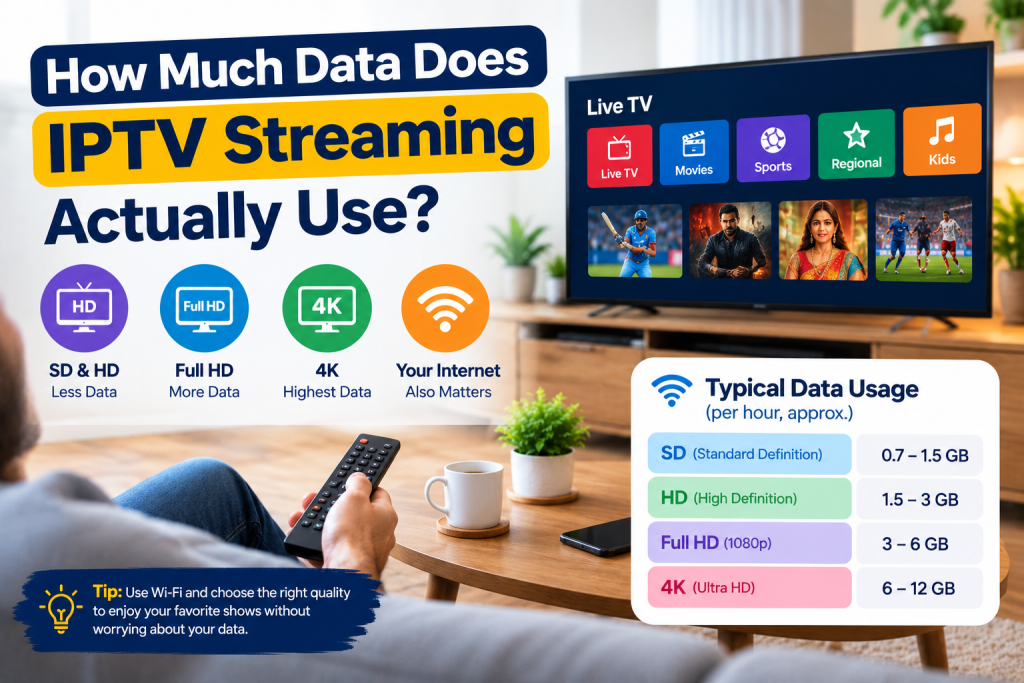
How Much Data Does IPTV Streaming Actually Use?
So you started using IPTV and now you’re wondering, how much data does this thing eat up? That’s a smart question to ask. Nobody likes getting a weird bill at the end of the month because they watched too many shows without even thinking about it.
Here’s the truth. It depends on a few things. Mainly what you’re watching and how clear the picture is. Higher quality video means more data used. Lower quality means less. It’s really that simple once you break it all the way down.
A lot of people jump into IPTV without ever checking this stuff. They just start watching shows and movies right away. Then later they get confused why their internet feels slow or their bill looks different than usual.
Let’s just go through it step by step so you get the full picture, without any confusing tech talk or weird jargon thrown at you.
What Actually Changes Your Data Usage
A few things decide how much data gets used when you stream. It’s not random at all. Let’s look at the main ones one by one, so nothing feels confusing later.
The picture quality is the biggest one by far. If you’re watching in low quality, you use less data. If you switch to super clear 4K, your data usage jumps up a whole lot. This is the number one thing that changes everything else.
The device you’re watching on matters too, even if just a little. Phones, TVs, and streaming boxes don’t always use data the exact same way. Some apps are just better at saving data while still giving you a pretty decent picture.
Your internet speed doesn’t really change how much data you use overall. But it does change how smooth the video plays while you watch. If your internet is slow, you might get buffering, and that buffering can actually waste even more data than usual.
The length of time you watch also plays a big role here. Watching for one hour uses way less data than watching for five hours straight. It sounds obvious, but a lot of people forget to think about this part.
Data Usage By Quality (Table)
Here’s a simple table so you can see it with your own eyes. This shows how much data gets used for each hour you watch, depending on the quality you pick.
| Video Quality | Data Used Per Hour |
| Standard Definition (SD) | 0.7 GB to 1 GB |
| High Definition (HD) | 1.5 GB to 3 GB |
| Full HD (1080p) | 3 GB to 4 GB |
| 4K Ultra HD | 7 GB to 10 GB |
Look at that jump from SD to 4K. That’s a huge difference, way bigger than most people expect. If your data plan is small, watching in 4K all the time is going to hurt you fast, so it helps to think about your settings.
How Much Data You Could Use In A Month
Let’s do some simple math here so this makes more sense. Say you watch IPTV for about 3 hours every single day. In HD, that adds up to somewhere around 60 GB to 90 GB a month. Not too crazy, but still something worth keeping an eye on.
Now if you’re watching in 4K for those same 3 hours a day, you could easily go past 200 GB in a month. That’s a really big number. A lot of home internet plans can handle it, but not all of them can, so it’s smart to check first before you binge everything in 4K.
A lot of folks who have an IPTV Subscription don’t even think about this stuff at all. They just watch what they want, when they want, without checking anything. But those hours pile up fast over a month, and that’s usually when people start seeing slow speeds or extra charges pop up out of nowhere.
It also helps to know that different shows use different amounts of data too. A fast paced action movie can use more data than a slow talk show, even at the same quality setting. This is because of how much movement is happening on the screen.
Tips To Keep Your IPTV Data Usage Low
Want to keep things under control? Here’s some easy stuff you can start doing today. Nothing complicated here, just small habits that actually help a lot over time without much effort at all.
1 – Turn down your video quality when you’re on a small screen like your phone, since you don’t really need 4K there anyway.
2 – Use Wi-Fi to download shows instead of using your mobile data, especially if your app lets you do that easily.
Look inside your IPTV app settings for something called data saver mode, a lot of apps have this hidden option somewhere.
3 – Try not to leave videos playing in the background while you’re doing other stuff, it quietly eats your data without you noticing.
4 – Set yourself a reminder once a month to actually check your data usage, so you catch anything weird early on.
5 – Close the app fully when you’re done watching instead of leaving it running in the background all day long.
Doing even two or three of these things can really help you enjoy your IPTV streaming without stressing about your data running out halfway through the month.
Why People Watching IPTV USA Should Pay Attention
If you’re in the United States watching IPTV, this matters even more for you specifically. Plans and prices change a lot between different providers here. Some have really strict data caps, others let you stream way more freely without any limits at all.
When you’re comparing different IPTV options made for IPTV USA viewers, don’t just look at the price tag alone. Check the data limits too, and check how smooth the video plays even when the data usage is lower than expected.
Some services are just smarter about this than others, even if they cost about the same. It’s worth spending a few extra minutes comparing before you actually commit to anything long term.
Picking the right provider from the start can save you a lot of headaches later. You won’t have to keep switching around or dealing with surprise limits once you find something that actually fits how you watch.
Warning Signs You’re Using Too Much Data
Sometimes you don’t even notice you’re going over your limit until it’s already become a problem. Here’s a few signs that tell you something’s off, so you can fix it before it turns into a bigger headache.
- Your internet just feels slower than normal, even when you’re not watching anything at all.
- You get a text or notification saying you’re close to your data cap for the month.
- Your bill shows up higher than what you usually pay every single month.
- Your shows start buffering way more than they used to, which usually means something’s not right.
- Other apps on your phone or laptop start loading slower than usual too, not just your IPTV app.
If you notice even one of these signs, it’s worth checking your usage right away. Way easier to fix a small habit now than deal with a big surprise bill later on down the road.
Wrapping This Up
Honestly, data usage isn’t some big mystery once you actually understand how quality affects it. Once you know that, you can make better choices about what you watch and how you watch it every single day.
Small stuff really does add up in a big way over time. A few small changes here and there can make a real difference by the end of the month, even if it doesn’t feel like much at first.
Whether you just started using IPTV last week or you’ve been doing this for years now, keeping an eye on your data helps you enjoy your shows without any stress hanging over you the whole time.
One last thing worth mentioning. If you share your IPTV account with family members, your total data usage adds up faster than you think. Everyone streaming at the same time on different devices can use a lot of data together, even if each person watches for a short while.